
Build a sandbox partner and experiment with sending and receiving EDI

Adrian Duyzer
Until now, it wasn’t easy to see how Tediware worked when you first signed up. That’s the nature of EDI: before you can watch a single document move, you need a trading partner: a connection, the implementation for each transaction set, mappings in both directions, flows wired together, and some test documents to push through. That’s a lot of assembly to do on faith, before you’ve seen the platform do anything at all.
So you can see results faster, I built a sandbox partner. One click gives you a complete, working integration you can run end to end, then take apart to see exactly how it’s put together.
What you get
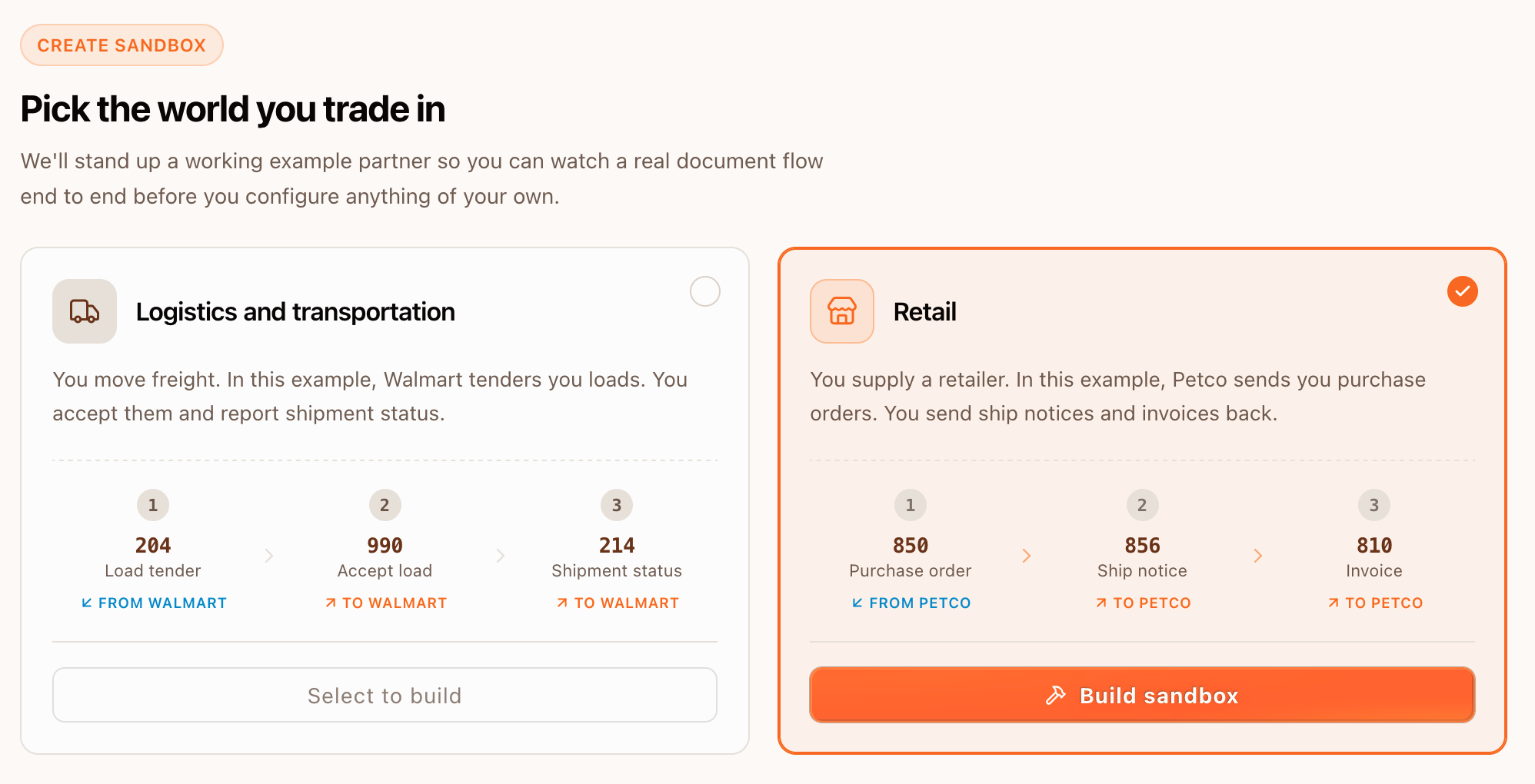
Pick an industry and Tediware builds the whole thing:
- Logistics: Walmart tenders you loads and you play the carrier. Inbound 204 load tenders, outbound 990 tender responses and 214 shipment status updates.
- Retail: Petco sends you purchase orders and you play the supplier. Inbound 850 purchase orders, outbound 856 advance ship notices and 810 invoices.
Behind that click the builder creates a sandbox connection, a partner, cloned implementations for each transaction set, validated mappings, an inbound flow and an outbound flow, and a small library of synthetic documents. Everything it makes is tagged Test, runs on a sandbox connection, and isn’t billed.
You’ll find it under Partners, with a Sandbox item in the menu. There’s also a callout on your dashboard that links to it.
Run the inbound side
A document is already waiting in the connection’s /inbound folder when the sandbox is built: a load tender if you picked logistics, a purchase order if you picked retail. Hit Process inbound flow and watch the trace run. Tediware reads the EDI, translates it to JSON, and tells your system the document is ready by calling your webhook.
The JSON your system receives is the thing to look at, so it’s front and center. You can also open the raw EDI in /inbound and the webhook sink to see the delivery land.
Run the outbound side
Now you reply. To send EDI back, your system POSTs JSON to Tediware, we map it to the partner’s shape, validate it, and write the file to /outbound. The request is the part that matters, so the sandbox shows you the exact call you’d make:
curl -X POST https://tediware.com/platform/partners/<KEY>/ts/990 \
  -H "Authorization: Key YOUR_API_KEY" \
  -H "Content-Type: application/json" \
  -d '{"contents": { ... your JSON ... }}'
The Send button runs exactly that request, on the same submission path your real integration would use, so what you watch in the sandbox is what you’ll get in production. In logistics you accept the tender with a 990, then report a status with a 214. In retail you acknowledge the order with an 856, then send the 810 invoice. The /inbound and /outbound folders fill in with real file contents as you go.
Take it apart
Watching it run is half of it. The rest is seeing how it’s built. Every object the sandbox uses is linked from the top of the panel: the partner, the connection, both flows, your webhook. Open the outbound flow and you’ll find the mapping that turned your JSON into the partner’s 990.
When you’ve poked at it enough, Reset clears the files you sent and the webhook deliveries and restores the seeded documents, so you can run it clean again. Remove deletes the whole thing, partner and flows and mappings and documents, if you’d rather switch to the other industry or just clear it out.
When you’re ready for the real thing
The sandbox is the same connection, flows, mappings, and submission API you’d build for a real partner, pre-assembled and tagged Test. When you want to point your own system at Tediware, create a real partner and an API key and you’re working with the machinery you already watched run.
Build a sandbox from the partners page. If you run it and something’s confusing or wrong, I’d love to hear about it. Email me at adrian@tediware.com.