
Generating Outbound EDI
Generating outbound EDI documents is significantly more complex than processing inbound EDI documents. That's because the EDI you generate needs to comply with the specifications of your trading partners, as described in their . To send them an EDI document, it has to be structured the way they want it.
That is not always true. If you are the "boss" in the commercial relationship, then you get to dictate the format. For instance, if you're Walmart, you get to set the terms. But if you're reading this guide that's probably not your situation - and it's certainly not Acme Trucking's.
In this section, you will learn how to transform data from your system into a format that complies with a trading partner's implementation guide. You'll learn what are, why they have historically been so difficult and time-consuming to build, and how Tediware makes this process easy.
Implementation Guides
To get Acme Trucking onboarded with EDI, Waldo Mart has sent Acme a bunch of documents. These documents - often referred to as 'specs', 'guides', or 'implementation guides' - are usually PDFs, although Excel files and Word documents are not uncommon. Some of these will be for inbound EDI and some for outbound. The four files Waldo Mart sent were:
- EDI_204_Outbound_TradingPartner_Final.pdf
- EDI_210_Inbound_TradingPartner_Final.pdf
- EDI_214_Inbound_TradingPartner_Final.pdf
- EDI_990_Inbound_TradingPartner_Final.pdf
Now what?
Well, Waldo's outbound is Acme's inbound. Waldo has just one outbound document, the 204, which is the load tender (sent when they are asking Acme to move a shipment). We talked about processing inbound EDI in the last section. It is perfectly reasonable to, at most, skim a trading partner's outbound document specifications and ask them to send a sample EDI document (often, there's a sample at the end of the guide).
It is trivial, using the right tools (like Tediware), to convert inbound EDI into JSON, and if the JSON is in a readable format, just reading it will tell you most of what you need to know.
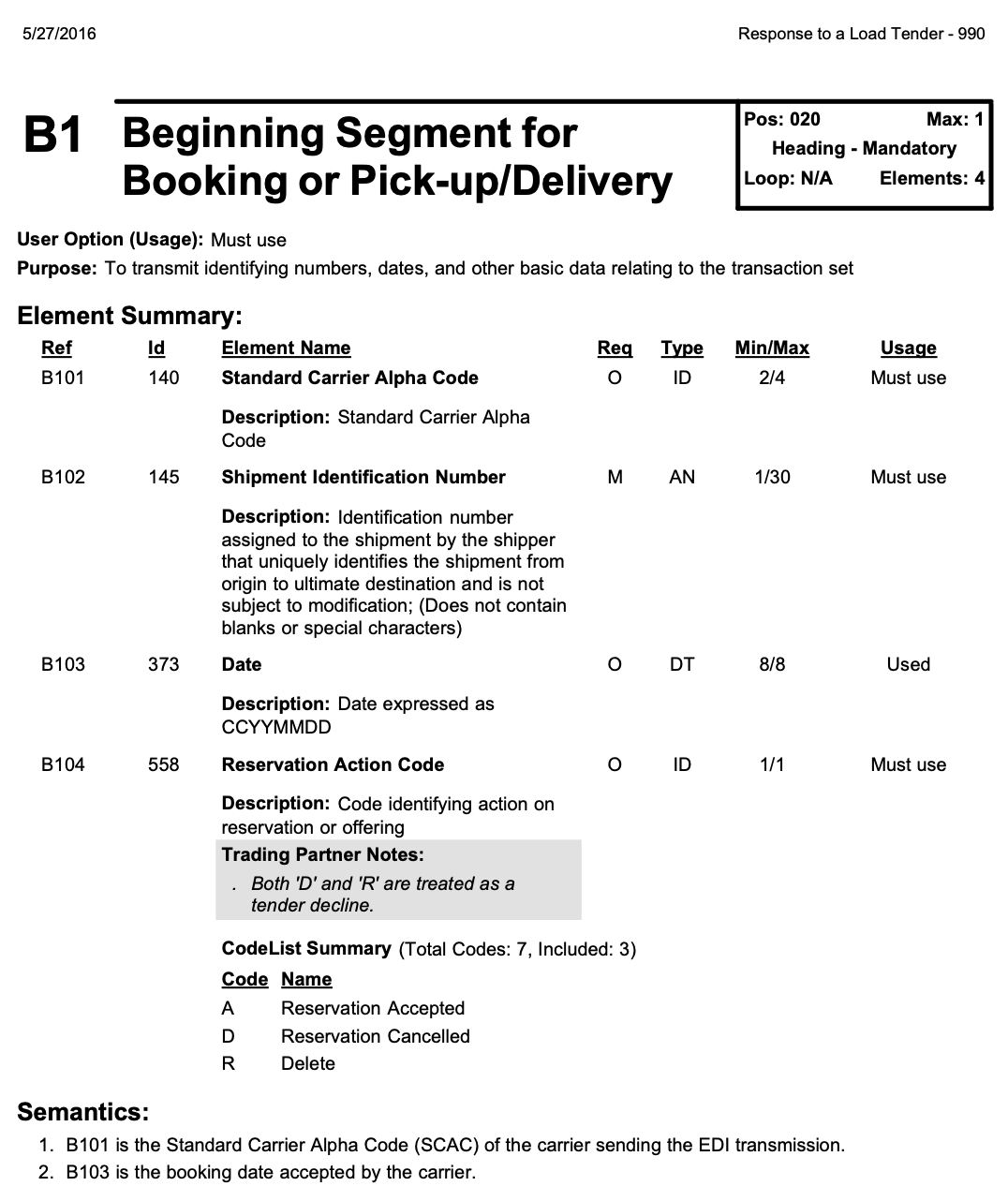
It's outbound where things get trickier. We will, however, keep using the 990 as our example. Remember the B1 from earlier, which contains the key information in the 990, namely, whether or not Acme accepts the load tender? Here's the page from the Waldo guide for that segment:
Reading the Guide
This page gives us two important pieces of information. First, the B1 segment is mandatory (indicated by "Must use" in the "User Option (Usage)" section). Second, the B1 segment contains four .
The elements are listed in a table with the following headings:
Ref:          Combination of the segment and the element position.
Id:           The X12 element ID number, shared across all transaction sets.
Element Name: The human-readable name of the element.
Req:          Whether the element is mandatory (M) or optional (O).
Type:         The data type: ID (code list), AN (alphanumeric), DT (date), etc.
Min/Max:      The minimum and maximum character length.
Usage:        Whether this trading partner requires the element ("Must use" or "Used").
Note the apparent inconsistency in the "Req" and "Usage" columns. B1-04, for example, is "O" (optional) according to Req and "Must use" according to Usage. Which is it?
If you look at this segment in the X12 reference, you'll see that it aligns with what you see on this page, although Tediware uses "R" (required) not "M".
B1 View the B1 segment in the X12 ReferenceReq is from X12: for the B1 segment to be valid X12, only B1-02 is required. Usage is from Waldo Mart: for the B1 segment to comply with Waldo's implementation, B1-01, B1-02, and B1-04 are all required. And in practice, B1-03 is always there too.
This is a crucial fact about implementations: a trading partner's implementation of an X12 transaction set can differ from it in many ways.
Now the key question is: where does the data that each element requires come from? Let's walk through each of them.
B1-01: Standard Carrier Alpha Code
This is a code that the carrier uses to identify itself, i.e. it's Acme Trucking's name in EDI land. (Discussing where this code comes from is not in-scope of this guide - if you get stuck on it, reach out!) This value is a constant for the carrier's organization.
B1-02: Shipment Identification Number
The notes on this element indicate that it is assigned by the shipper. Where does this number come from? It comes from the 204. When Waldo Mart sends the 204, one of the fields it sends is the shipment ID from their system. Acme needs to capture that ID and send it back to them in the 990. That's the only way Waldo Mart knows which shipment Acme is accepting or declining.
This is a pattern you will encounter constantly in EDI: outbound documents reference data from inbound documents. The 990 is a response to the 204, so it needs to echo back identifiers that the sender originally provided. Every time you process an inbound document, think about what data you'll need to include when you respond.
Let's use "12345678" for this example.
B1-03: Date
The booking date in CCYYMMDD format, e.g. '20260401' to represent April 1, 2026. This comes from Acme's system.
B1-04: Reservation Action Code
The reservation action code: either "A" if Acme is accepting the tender, or "D" if they are declining it. This also comes from Acme's system. Let's say Acme has decided they don't want this load: they'll send a D in this case.
Putting It All Together
Now that Acme has collated the data, they can write this portion of the EDI file. They just have to spit out a line of text like this:
B1*ACME*12345678*20260401*D~As an experienced software developer, you know how to write out lines of text. You probably even know how to do string interpolation! Go ahead, breathe a sigh of relief.
But then take another deep breath, because we're not done here.
Data Types Matter
We can send the shipment identification number, 12345678, without thinking about how it's formatted. That is not the case for many other elements that you'll need to send to your partners.
I once had a trading partner ask me why the shipments we were billing for had suddenly become so cheap.
On investigation, I realized I was sending numbers like 900 in a field that was defined as an N2.
An N2 is a numeric type that implies two decimal places. That means 900 == 9.00, i.e. $9.00 instead of $900.00. To bill $900.00 for a shipment, I should have been sending 90000, not 900!
X12 defines data types for every element: ID, AN, N, Nn, R, DT, TM. These types dictate how values must be encoded in the EDI files that you create.
Types View the full X12 data type reference in the X12 ReferenceSome examples:
- DT means date in
CCYYMMDDformat: April 1, 2026 becomes20260401. - TM means time in
HHMM(orHHMMSS): 2:30pm becomes1430. - R means a real number: the decimal point is written.
- ID means the value must come from a specific code list (e.g. "A" or "D" for B1-04).
- AN is alphanumeric - mostly freeform, but min/max length still applies.
- Min/max length is enforced too: an N2 field with Min/Max 1/6 won't accept
1000000.
Get any of this wrong and the trading partner's parser rejects the document, or someone emails you and complains.
This means you cannot generate compliant EDI with string interpolation alone. The generator has to know each element's X12 type and any overrides from the implementation guide.
Trading Partners Want Different Things
I've been using the 990 as an example because it is one of the simplest documents in EDI. In my experience, pretty much everyone handles the 990 in the same way: the B1 segment is always present and it's always structured the same way.
But not all documents are this simple. Consider the 214 Shipment Status Update, which is used to communicate where a shipment is at a particular moment and what is going on with it. Trading partner requirements for the 214 vary wildly. Sometimes a trading partner just wants to know the shipment ID, its current location and its status (e.g. "normal status", "delayed due to weather", etc.) Sometimes a partner also wants you to include the name and address of the shipper and the consignee. Sometimes a partner wants the full list of every stop along the way.
214 View the 214 in the X12 ReferenceIf you attempted to handle these differences as a series of conditionals ("if trading partner == 'X', then write these strings, otherwise..."), the level of complexity would get out of hand quickly.
Mappings
This is where mappings enter the picture. A mapping is a transformation layer that turns your data into a format that complies with what your trading partner expects. Mappings let your system emit data in a consistent format. Adding a new trading partner doesn't require you to change what your system produces. Instead, you create (or re-use) a mapping for that trading partner.
Let's look at a concrete example. Consider the B1 segment in the 990. The B1-04 element is used to communicate whether or not Acme accepts the shipment. Does it make sense for Acme's system to emit an "A" or "D" for accept or decline? If so, no mapping is required. But what if Acme's system actually uses a boolean field? In that case, the data might look like this:
{
  "id": 14928201,
  "externalId": 12345678,
  "accepted": false
}
We can use a mapping to convert this so it complies with Waldo Mart's expectations for the B1. In Tediware, mapping expressions are created using JSONata:
{
  "heading": {
    "beginning_segment_for_booking_or_pick_up_delivery_B1": {
      "standard_carrier_alpha_code_01": "ACME",
      "shipment_identification_number_02": $string(externalId),
      "date_03": $now("[Y0001][M01][D01]"),
      "reservation_action_code_04": accepted ? "A" : "D"
    }
  }
}
This mapping takes the data Acme's system produces and transforms it
into the format Waldo Mart expects - converting
false to "D",
pulling the shipment ID from externalId,
and so on. If another trading partner uses different codes or expects
the data structured differently, Acme writes a different mapping. Their
system's output stays the same.
AI-Generated, Schema-Constrained Mappings
If you're thinking "this sounds like a lot to write by hand," you're right. This is where Tediware takes a different approach.
Implementation guides are converted to machine-readable specifications, which are then used to generate JSON schemas. With a JSON schema that captures the precise requirements of a trading partner's implementation guide, two things become possible: first, any mapping you write can be validated against the schema to guarantee it produces compliant output. Second, and more importantly, the mapping can be generated by AI - because the schema gives the AI a precise target to hit.
The result is that adding a new trading partner goes from days of manual mapping work to minutes of review.
To see this in action, check out the mapping demo.