
Sandbox webhooks: see a real delivery before you build your endpoint

Adrian Duyzer
When you integrate inbound EDI with Tediware, the JSON we translate from your partner’s documents gets pushed to a webhook you control. That beats polling, but it creates a chicken-and-egg problem while you’re building: to see what a delivery actually looks like, you need a public HTTPS endpoint to receive it. Before you can write a line of code against a real payload, you’re setting up ngrok or a throwaway endpoint, just to see the shape of the data.
Sandbox webhooks eliminate that friction.
What it is
A sandbox webhook delivers to a sink built into the app instead of to an endpoint of your own. You create it like any other webhook: pick Sandbox as the kind, and open it to watch deliveries land.
The most important thing about the design is that the delivery is real. A sandbox webhook is an ordinary webhook whose URL happens to point back at Tediware. It travels over HTTP through the same code that sends production webhooks, so the body, headers, and signature match production exactly. Nothing is simulated; it’s just captured somewhere you can read it instead of sent to a server you’d have to build first.
What you see
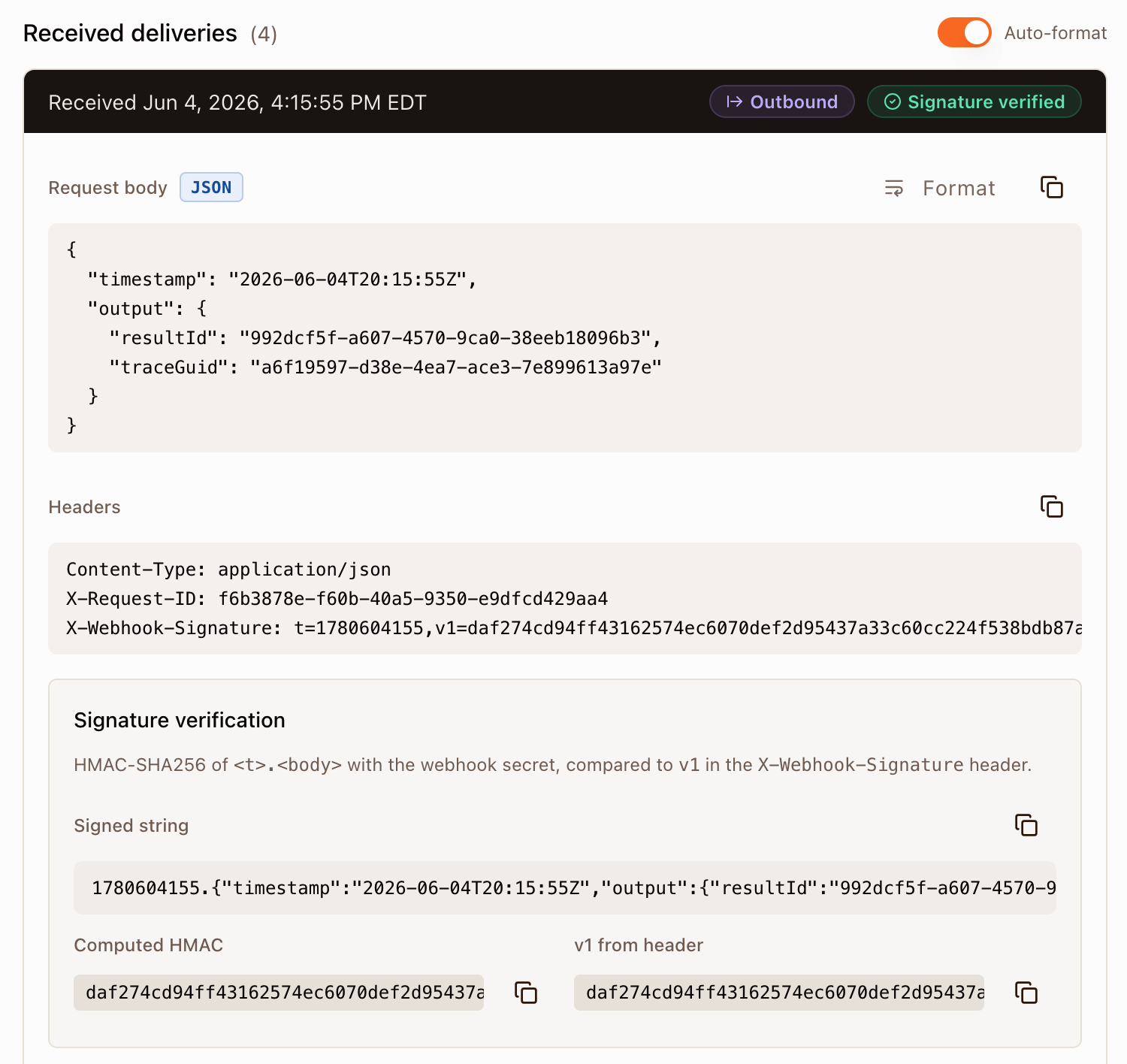
Run an inbound flow and a delivery shows up on the sink page within a second or two. Each one shows when it arrived, whether its signature verified, and what kind it is: Inbound (EDI from a partner translated to JSON), Outbound (your JSON generated into EDI), or Error.
The body is the same minimal payload every webhook gets:
{
  "timestamp": "2026-03-30T14:22:33Z",
  "output": {
    "resultId": "4c2021f8-8310-4628-80f9-b578d4d68e11",
    "traceGuid": "5ab72145-4a4b-40f6-95de-e2579f163f79"
  }
}
We send identifiers, never the document content. You take the resultId and fetch the full result through the API when you’re ready.
The sink page includes features which are aimed to teach.
The first is the signature breakdown. Every delivery is signed with an HMAC-SHA256 of <timestamp>.<body>, sent as the v1 value in the X-Webhook-Signature header. The sink lays out the signed string, the HMAC it computed from your secret, and the v1 from the header side by side, so you can see verification work step by step instead of guessing why your own check fails.
The second is the fetch. To pull the result behind a delivery you need an API key, so the sink lets you provision a sandbox key with one click. It’s scoped to that sink: it can only read the results delivered there and their artifacts, so it’s safe to copy into a script and experiment with. The page hands you a ready-made command to fetch the result and each artifact, with an Execute button that runs the call right in the browser. Each artifact has a usage of input or output: for inbound, the input is the partner’s EDI and the output is the JSON translation.
A couple of things to know
A flow that delivers to a sandbox webhook stays Paused. It won’t process on its own; you run it with Process while you’re testing. That keeps test traffic off the scheduler.
When you’re ready for production, create a standard webhook pointed at your real endpoint. Everything you learned in the sandbox carries straight over, because it was the same delivery all along.
Where to read more
The Webhooks help in the app and the public docs at https://tediware.com/resources/docs/webhooks cover signature verification and the sink in detail. The API reference at https://tediware.com/resources/api-docs/webhooks describes in detail how webhooks work from an API perspective and include code examples in Node and Python.