
Automated alerts when a partner's traffic stops or drops

Adrian Duyzer
Tediware now automatically detects unusual drops in trading partner activity and alerts you. There are two alert conditions: when a trading partner doesn’t send anything on a day that it normally sends transactions on, and when a trading partner’s weekly volume falls below half its usual level.
Alerts are on by default for every organization and every partner, so you may receive one without changing anything. The email goes to everyone in your organization who receives error notifications, and a second email follows when the partner’s traffic resumes.
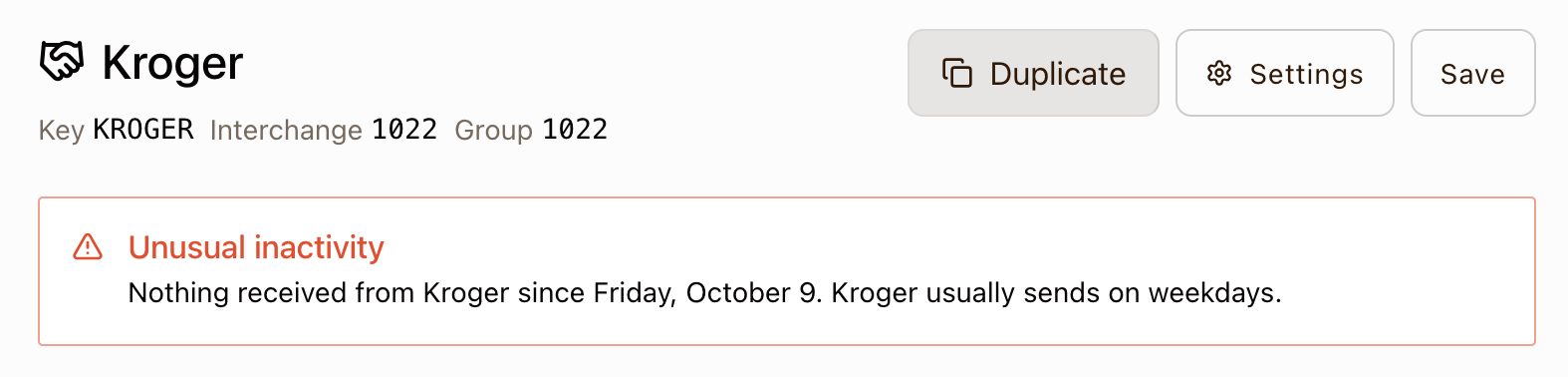
You’ll also see a warning indicator on the Partners page, and the individual partner page will also display an error banner, like this:
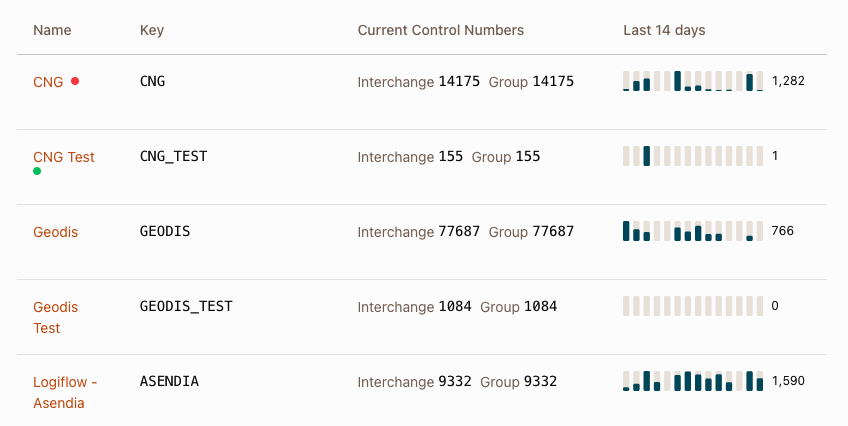
The Partners page has also been updated with spark charts that show the last 14 days of traffic for each of your trading partners, giving you a way to review traffic volume at a glance:
Turning Off Alerts
If a partner trades on an irregular schedule, open its partner page, click Settings, and clear Alert on unusual inactivity. To turn alerts off for every partner, edit your organization settings.
How It Works In Detail
How a stop in traffic is detected:
- A partner’s usual days are the days of the week that had traffic in at least 3 of the 4 weeks before it went quiet. Days follow your organization’s time zone.
- The alert opens once two of those usual days ends with no traffic. A weekday partner’s quiet weekend never alerts, and a partner that sends only on Mondays alerts after a Monday with nothing.
- The alerts are “holiday-aware”: holidays are tracked and alerts do not fire when a holiday can explain a stop in traffic (currently restricted to the United States and Canada)
- Time of day does not matter, so a file that arrives earlier or later than usual on one of its usual days does not count as a miss.
How a drop in traffic is detected:
- The alert opens when the last 7 days carried at most half the partner’s average weekly transaction count, and that shortfall is at least three standard deviations below the average.
- The drop check only applies to partners that average at least 20 transactions a week. Lower-volume partners get the stop check alone.
- The alert closes when the trailing 7 days are back above half the average the alert opened with.
What is counted:
- Inbound and outbound traffic are watched separately, and each direction alerts on its own.
- Test traffic (ISA15
T), 997 and 999 acknowledgments, and sandbox partners are left out.
Limits:
- A partner needs 28 days of production history before it can alert.
- Partners without a regular weekly pattern, such as one that sends every other week or at random, are not covered.
- A holiday on one of a partner’s usual days will alert, followed by a recovery email when traffic resumes. There is no way to snooze an alert yet.
- Each partner and direction is watched as a whole, so a partner whose 850s stop while its 856s keep arriving does not alert.
- A partner that had already been quiet for more than about two weeks when alerts first checked it is not reported.
- Alerts are delivered by email only. There is no webhook for them yet.
- Turning alerts off, for one partner or the whole organization, closes any open alerts without a recovery email.
Full details are in the partner docs.
This update was written with AI assistance. It has been reviewed and edited by a human.