
Macropoint to EDI 214: Automating Shipment Status Updates

Adrian Duyzer
The 214 Transportation Carrier Shipment Status Message is used to communicate what is going on with a particular shipment. It supports a huge range of events and problems, but the information that is most commonly requested by trading partners fits into two main categories:
- What’s going on with the pickups and delivery stops: has the truck arrived, has it left, etc.
- Where is the shipment right now?
It is theoretically possible to send 214s for the first category manually. That is, you could have your operations team fill out a form in your TMS to send the 214 whenever one of your trucks arrives at or departs a facility. The second category is much more problematic, because most partners want these updates regularly, like every 15 minutes. Good luck trying to get your dispatchers to do that.
Fortunately, there’s an excellent alternative: use live tracking data to send these instead. In this post, I’ll describe how to integrate Descartes Macropoint into your TMS so 214s from both categories get sent automatically (you’ll need a Macropoint account for this, of course).
Macropoint is a supply chain visibility solution. It integrates with ELD systems but they also have an app, and it’s on every owner/operator’s phone already.
Whether via the driver’s phone or ELD, Macropoint can push every arrival, departure and GPS ping to you. So the work is translation: take what Macropoint sends, decide what each shipper should get, and deliver it as a valid 214 without anyone typing it in.
This guide walks through that pipeline step by step. It’s based on a production Macropoint integration that runs on Tediware. Your app handles the Macropoint side: webhooks, matching, status codes and time. Tediware handles the EDI side: the per-partner mapping, validation, envelopes, delivery and acknowledgements.
By the end you will have:
- Webhook endpoints that accept Macropoint trip events and location pings
- A way to connect every event to the right shipment and stop
- Arrival and departure 214s (
X3,AF,X1,D1) and en-route GPS 214s (X6) - One JSON payload for every shipper, with a Tediware mapping per partner that turns it into their 214
The code samples are TypeScript. You can adapt them to your own stack.
Solution Diagram
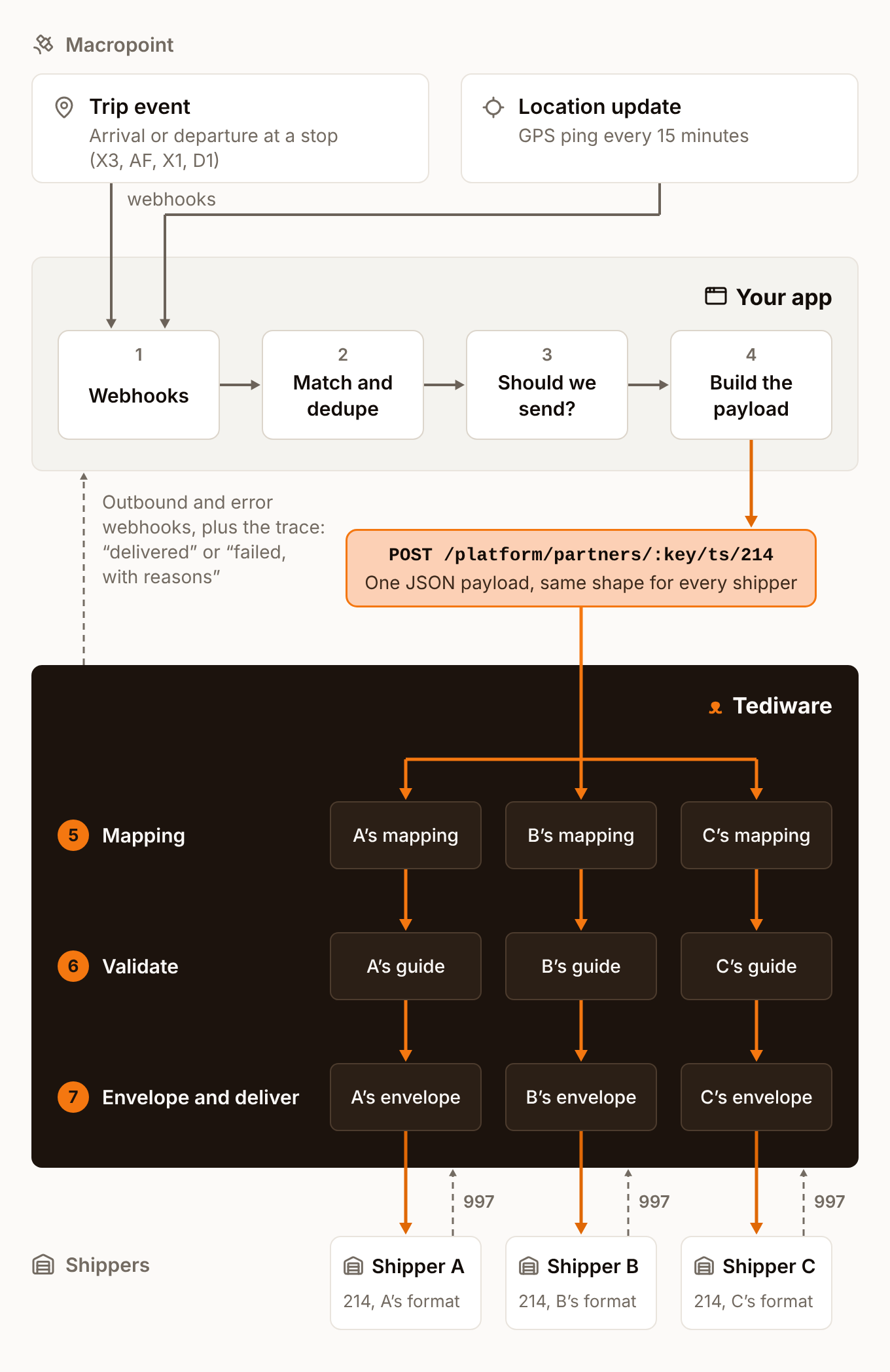
Step 1: Receive the webhooks
Macropoint pushes data to you. There’s no polling. You set this up when you create each tracking order in Macropoint by including a Notification block that says who you are and how to identify the load:
<Notifications>
  <Notification>
    <PartnerMPID>YOUR_MPID</PartnerMPID>
    <IDNumber>PRO11437</IDNumber>          <!-- your load number; comes back as "ID" -->
    <TrackDurationInHours>168</TrackDurationInHours>
    <TrackIntervalInMinutes>15</TrackIntervalInMinutes>
  </Notification>
</Notifications>
Each stop in the order’s trip sheet also takes a StopID. Put your own stop identifier there, because Macropoint returns it with every trip event. That makes Step 2 easy.
Two of Macropoint’s webhooks feed 214s:
| Webhook | Fires when | Becomes |
|---|---|---|
| Trip event | the driver arrives at or departs from a stop | an arrival or departure 214 |
| Location update | a GPS ping comes in, at the tracking interval | an X6 en-route 214 |
A trip event looks like this:
{
  "MPOrderID": "02EF4EF7D4C04C12ADEA700A3647ABA9",
  "ID": "PRO11437",
  "Stop": "Plainfield Consolidation Center",
  "StopID": "69",
  "Event": "X3",
  "EventDateTime": "2023-04-05T20:09:28Z",
  "ApproxLocationDateTimeInLocalTime": "2023-04-05T16:09:28",
  "Latitude": "39.62075400",
  "Longitude": "-86.49096400",
  "City": "Clayton",
  "State": "IN",
  "Postal": "46118",
  "Country": "US",
  "UpdatedBy": "Driver"
}
Keep the handler small. It checks the caller, saves the event and queues the work. Nothing EDI-related happens in the request.
import express, { type Request } from "express";
import ipaddr from "ipaddr.js";

const app = express();
app.use(express.urlencoded({ extended: false }), express.json());

// Macropoint publishes the address ranges its webhooks come from.
const MACROPOINT_RANGES = (process.env.MACROPOINT_CIDRS ?? "")
  .split(",")
  .map((cidr) => cidr.trim())
  .filter(Boolean)
  .map((cidr) => ipaddr.parseCIDR(cidr));

// Set Express's "trust proxy" to match your load balancer, or req.ip is the proxy's address.
function fromMacropoint(req: Request): boolean {
  if (!req.ip || !ipaddr.isValid(req.ip)) return false;
  const ip = ipaddr.process(req.ip);
  return MACROPOINT_RANGES.some(
    ([range, bits]) => ip.kind() === range.kind() && ip.match(range, bits),
  );
}

app.post("/macropoint/trip-event", async (req, res) => {
  if (!fromMacropoint(req)) return res.sendStatus(403);

  // Read fields from the query string and the body, whichever Macropoint used.
  const result = await saveTripEvent({ ...req.query, ...req.body } as Record<
    string,
    string
  >);
  if (!result.ok) return res.status(422).json({ errors: result.errors });

  if (result.isNew)
    await queue.add("trip-event-214", { tripEventId: result.id });
  res.sendStatus(201);
});
The location-update handler has the same shape. You should:
- Save the raw event before doing anything else. When a shipper asks why a 214 said what it said, the stored row is your answer. It’s also what you retry from.
- Send from a background job, not from inside the webhook request. If building or sending a 214 is slow, the webhook shouldn’t hang.
Step 2: Match each event to a shipment and a stop
A 214 about a stop has to say which stop it means. Most shippers want the stop sequence number from their original 204 load tender, often in an L11 segment with qualifier QN. So every trip event must lead back to a shipment, and then to one of its stops.
You set up both links in Step 1. ID is your load number and StopID is your stop identifier, so matching takes two lookups:
interface TripEvent {
  mpOrderId: string;
  shipmentId: string;
  stopId: string;
  code: string; // Macropoint "Event": X3, AF, X1 or D1
  happenedAtUtc: string; // "EventDateTime"
  happenedAtLocal: string; // "ApproxLocationDateTimeInLocalTime", no offset
  latitude: number;
  longitude: number;
  city: string;
  state: string;
  postal?: string;
  country: string;
}

async function saveTripEvent(p: Record<string, string>) {
  const shipment = await db.shipments.findByLoadNumber(p.ID);
  const stop = shipment && (await db.stops.find(shipment.id, p.StopID));

  if (!shipment || !stop)
    return {
      ok: false as const,
      errors: [`Unknown load or stop: ${p.ID} / ${p.StopID}`],
    };

  const errors: string[] = [];
  if (!p.EventDateTime || !p.ApproxLocationDateTimeInLocalTime)
    errors.push("Missing timestamps");
  if (
    Number.isNaN(parseFloat(p.Latitude)) ||
    Number.isNaN(parseFloat(p.Longitude))
  )
    errors.push("Missing coordinates");
  if (errors.length) return { ok: false as const, errors };

  const event: TripEvent = {
    mpOrderId: p.MPOrderID,
    shipmentId: shipment.id,
    stopId: stop.id,
    code: p.Event,
    happenedAtUtc: p.EventDateTime,
    happenedAtLocal: p.ApproxLocationDateTimeInLocalTime,
    latitude: parseFloat(p.Latitude),
    longitude: parseFloat(p.Longitude),
    city: p.City,
    state: p.State,
    postal: p.Postal || undefined,
    country: p.Country,
  };

  // A unique index on (mpOrderId, stopId, code, happenedAtUtc) turns a repeated webhook into a no-op.
  const { id, inserted } = await db.tripEvents.insertIgnoringDuplicates(event);
  return { ok: true as const, id, isNew: inserted };
}
Make sure you deduplicate. Webhooks can be delivered more than once. Without the unique index, a repeated arrival becomes a repeated 214. Also, when an arrival or departure lands, write it back to your own stop record if that field is still empty. Never overwrite a time a dispatcher entered by hand. That way your TMS agrees with the 214 you just sent.
Step 3: Map events to 214 status and reason codes
This is easy because Macropoint’s Event field already holds an X12 shipment status code, so it goes straight into AT7-01:
Macropoint Event |
AT7-01 meaning |
Stop |
|---|---|---|
X3 |
Arrived at pickup location | Pickup |
AF |
Carrier departed pickup location | Pickup |
X1 |
Arrived at delivery location | Delivery |
D1 |
Completed unloading at delivery location | Delivery |
X6 (you set it) |
En route to delivery location | Location ping |
Macropoint sends D1 when the truck leaves the delivery stop. In X12, though, D1 means unloading is complete, and the departure code is CD. If a shipper’s guide asks for CD, swap the code in their mapping and keep D1 in their statusCodes below, since that list filters Macropoint’s codes.
The reason code, AT7-02, is always NS (normal status). Macropoint can’t know why a truck is late, so the 214 shouldn’t pretend to. A delay with a real reason should still come from a person.
The real decision is whether to send anything at all. Keep a small record of what each shipper accepts, and check it before you build a payload:
interface ShipperEdiSettings {
  partnerKey: string; // the trading partner's key in Tediware
  statusCodes: string[]; // status codes this shipper gets, e.g. ["X3", "AF", "X1", "D1", "X6"]
  timeCodes: string[]; // AT7-07 codes they accept, e.g. ["LT"] or ["CT", "ET"]
}

function shouldSend(
  order: { sendTripEvents: boolean; sendLocationUpdates: boolean },
  settings: ShipperEdiSettings | undefined,
  code: string,
): settings is ShipperEdiSettings {
  if (!settings) return false; // this shipper doesn't take EDI
  if (!settings.statusCodes.includes(code)) return false;
  return code === "X6" ? order.sendLocationUpdates : order.sendTripEvents;
}
The per-order switches matter in practice. A dispatcher needs a way to turn off automated 214s for a single load, for example when a driver’s phone is reporting nonsense. Default the switches from a shipper or branch setting so most loads need no clicks.
The same statusCodes list can drive the status dropdown dispatchers use for manual updates, so nobody can pick a code the shipper will reject.
Step 4: Turn location pings into X6 214s
A location ping becomes an X6 with reason NS. It differs from a trip event:
Not every shipper wants pings. At a 15-minute tracking interval, one truck produces about 96 a day. Some shippers want every one. Others want arrivals and departures only. That’s why X6 is in the statusCodes list and has its own per-order switch.
There is no stop. A ping happens between stops, so it carries coordinates and no stop sequence number. Leave stopSequenceNumber out of the payload entirely. Some shippers reject an X6 that carries one.
MS1 takes a city or coordinates, never both. One MS1 holds either a city with its state, country and postal code, or a longitude and latitude. X12 forbids both in the same segment. Put both in the payload anyway, and let each shipper’s mapping pick the one their guide asks for.
Coordinates go out in degrees, minutes and seconds. MS1-04 and MS1-05 take longitude and latitude as seven digits, DDDMMSS. The hemispheres go in MS1-06 and MS1-07. Macropoint sends decimal degrees, so convert them:
function toDms(decimal: number): string {
  const abs = Math.abs(decimal);
  const degrees = Math.floor(abs);
  const minutesFloat = (abs - degrees) * 60;
  const minutes = Math.floor(minutesFloat);
  const seconds = Math.floor((minutesFloat - minutes) * 60);
  return (
    String(degrees).padStart(3, "0") +
    String(minutes).padStart(2, "0") +
    String(seconds).padStart(2, "0")
  );
}

function gps(latitude: number, longitude: number) {
  return {
    latitude: toDms(latitude),
    latitudeDirection: latitude >= 0 ? "N" : "S",
    longitude: toDms(longitude),
    longitudeDirection: longitude >= 0 ? "E" : "W",
  } as const;
}

gps(39.620754, -86.490964);
// { latitude: "0393714", latitudeDirection: "N", longitude: "0862927", longitudeDirection: "W" }
Pad latitude to three degree digits too. It never goes above 90, but the element is fixed-width.
If a shipper wants fewer pings, throttle per load. At the end of each window, send the freshest position you have. That way a skipped ping is replaced by newer data instead of being lost.
Step 5: Get dates, times and timezones right
This is the hard part! AT7-05 and AT7-06 hold the date and time, and AT7-07 holds a time code. That code isn’t an IANA timezone. It’s an X12 code, and each zone gets three of them: CT is Central Time, standard or daylight, whichever is in effect, while CS and CD pin it to one or the other. Your trading partners also disagree about which codes they want, and some want LT, “local time”, which isn’t a zone at all.
Macropoint gives you two timestamps per event, and you’ll need both:
| Field | Example | Use it when |
|---|---|---|
EventDateTime (trip events), LocationDateTimeUTC (pings) |
2023-04-05T20:09:28Z |
the shipper wants a named zone such as ET or CT |
ApproxLocationDateTimeInLocalTime |
2023-04-05T16:09:28 |
the shipper accepts LT, local time where the truck is |
If the shipper accepts LT, send Macropoint’s local time. Otherwise, take the UTC time, convert it to the first zone the shipper allows, and send that zone’s code:
const ZONES: Record<string, string> = {
  TT: "America/Halifax", // Atlantic. X12's "AT" is Alaska.
  ET: "America/New_York",
  CT: "America/Chicago",
  MT: "America/Denver",
  PT: "America/Los_Angeles",
  AT: "America/Anchorage",
};

function statusTime(
  event: { happenedAtUtc: string; happenedAtLocal: string },
  timeCodes: string[],
): { date: string; time: string; timezoneCode: string } {
  if (timeCodes.includes("LT")) {
    // "2023-04-05T16:09:28" has no offset. Cut it up as text; parsing it would apply the server's zone.
    const [date, time] = event.happenedAtLocal.split("T");
    return {
      date: date.replaceAll("-", ""),
      time: time.slice(0, 5).replace(":", ""),
      timezoneCode: "LT",
    };
  }

  const timezoneCode = timeCodes.find((code) => code in ZONES);
  if (!timezoneCode)
    throw new Error(`No usable time code in ${timeCodes.join(",")}`);

  const parts = Object.fromEntries(
    new Intl.DateTimeFormat("en-US", {
      timeZone: ZONES[timezoneCode],
      year: "numeric",
      month: "2-digit",
      day: "2-digit",
      hour: "2-digit",
      minute: "2-digit",
      hourCycle: "h23",
    })
      .formatToParts(new Date(event.happenedAtUtc))
      .map((part) => [part.type, part.value]),
  );
  return {
    date: `${parts.year}${parts.month}${parts.day}`,
    time: `${parts.hour}${parts.minute}`,
    timezoneCode,
  };
}
For the trip event above, a shipper that accepts LT gets 20230405 at 1609 LT. One that only takes Central gets 20230405 at 1509 CT. It’s the same damn time.
Step 6: Design one payload for every shipper
You now have everything a 214 needs. Most of it comes from the load, not from Macropoint: the shipper’s IDs and reference numbers arrived on their 204 tender, which you saved already. Macropoint adds only the status, the time and the place.
Put all of it into one JSON shape. Use that same shape for every shipper, and let Tediware handle the differences between them. This is the payload your app sends, which Tediware calls the mapping’s source:
interface StatusUpdate {
  shipmentId: string; // the shipper's shipment ID, from their 204
  shipmentTrackingNumber: string; // your load or PRO number
  shipmentStatus: string; // AT7-01
  shipmentStatusReason: "NS"; // AT7-02
  stopSequenceNumber?: string; // trip events only; leave out for X6
  date: string; // CCYYMMDD
  time: string; // HHMM
  timezoneCode: string; // LT, ET, CT, ...
  city?: string;
  stateOrProvinceCode?: string;
  postalCode?: string;
  countryCode?: string;
  latitude?: string; // DDDMMSS
  latitudeDirection?: "N" | "S";
  longitude?: string; // DDDMMSS
  longitudeDirection?: "E" | "W";
  equipmentNumber?: string; // trailer, or tractor if there's no trailer
}
Some tips:
- Name fields after what they mean, not after segments.
stopSequenceNumberworks with a partner who wants it in anL11, anN9or not at all.L11_01doesn’t. - Send everything you know, even if a shipper ignores it. Each mapping takes what it needs. Adding a field to the source later is safe, because additive changes don’t break existing mappings.
- Leave out what you don’t know. If a field is missing, the mapping can drop the segment. A field set to an empty string can still produce an empty segment.
Step 7: Create one mapping per shipper
In Tediware, a mapping turns your source into one partner’s 214. It’s written in JSONata and checked against that partner’s implementation, which is built from their EDI guide. You write the source once. Then you add one mapping per shipper.
You don’t have to write mappings yourself, and you shouldn’t. This is AI’s job, and in Tediware, the mapping assistant does it all for you. You can see a demo of AI-assisted mapping here.
Your trading partners want their 214s in their own specific format and structure, as defined in their guides. When you add a new trading partner in Tediware you build a new mapping for them using the same source you’re already using. This lets you add new trading partners without having to update any code in your TMS.
Step 8: Send it and follow it through
Here’s the job that ties Steps 2 to 6 together and sends the result to Tediware:
// Macropoint may send a code ("US") or a name ("Canada"); shippers want a two-letter code.
const COUNTRY_CODES: Record<string, string> = {
  US: "US",
  USA: "US",
  "UNITED STATES": "US",
  CA: "CA",
  CAN: "CA",
  CANADA: "CA",
  MX: "MX",
  MEX: "MX",
  MEXICO: "MX",
};

// Unknown countries are left out of the payload rather than guessed.
function countryCode(country: string): string | undefined {
  return COUNTRY_CODES[country.trim().toUpperCase()];
}

async function sendTripEvent214(tripEventId: string) {
  const event = await db.tripEvents.get(tripEventId);
  const order = await db.macropointOrders.get(event.mpOrderId);
  const shipment = await db.shipments.get(event.shipmentId);
  const stop = await db.stops.get(event.stopId);
  const settings = await db.shipperEdiSettings.find(shipment.shipperId);

  if (!shouldSend(order, settings, event.code)) return;

  const contents: StatusUpdate = {
    shipmentId: shipment.shipperShipmentId,
    shipmentTrackingNumber: shipment.loadNumber,
    shipmentStatus: event.code,
    shipmentStatusReason: "NS",
    stopSequenceNumber: String(stop.sequenceNumber),
    ...statusTime(event, settings.timeCodes),
    city: event.city,
    stateOrProvinceCode: event.state,
    postalCode: event.postal,
    countryCode: countryCode(event.country),
    ...gps(event.latitude, event.longitude),
    equipmentNumber: shipment.trailerNumber ?? shipment.tractorNumber,
  };

  const receipt = await sendToTediware(
    settings.partnerKey,
    "214",
    contents,
    `214-${shipment.loadNumber}-${tripEventId}.edi`,
  );
  await db.statusMessages.create({
    tripEventId,
    contents,
    traceGuid: receipt.traceGuid,
    ediTransactionId: receipt.ediTransactionId,
  });
}
The location-update job is the same, except that it sets shipmentStatus to "X6" and leaves out stopSequenceNumber.
Sending is one HTTP call to Tediware’s outbound EDI endpoint:
class TediwareError extends Error {
  constructor(
    readonly status: number,
    readonly code: string,
    readonly reason?: string,
    message?: string,
  ) {
    super(message ?? code);
  }
}

async function sendToTediware(
  partnerKey: string,
  transactionSet: string,
  contents: object,
  filename: string,
) {
  const res = await fetch(
    `https://tediware.com/platform/partners/${partnerKey}/ts/${transactionSet}`,
    {
      method: "POST",
      headers: {
        Authorization: `Key ${process.env.TEDIWARE_API_KEY}`,
        "Content-Type": "application/json",
      },
      body: JSON.stringify({ contents, filename }),
    },
  );

  const body = await res.json();
  if (!res.ok) {
    const { code, reason, message } = body.error;
    throw new TediwareError(res.status, code, reason, message);
  }
  return body as {
    traceGuid: string;
    ediTransactionId: string;
    interchangeControlNumber: number;
    groupControlNumber: number;
  };
}
Tediware assigns the control numbers and builds the ISA and GS envelope from the partner’s settings, so you don’t have to put that stuff into the payload.
A 200 response means Tediware has received your payload, not that the shipper has it. Mapping, validation and delivery all run afterwards. A payload that fails the partner’s schema still gets a 200 and fails a few seconds later, on its trace. So:
- Save the
traceGuidwith your status record. It ties the 214 to everything that happens next: the mapping result, delivery, the logs and the partner’s 997. - Listen for the outcome. Tediware calls your outbound webhook when a 214 is delivered, and your error webhook when one fails. You can also poll
GET /platform/traces/:traceGuiduntilprocessingisfalse. See logs, results and traces. - Branch on
code, not just the HTTP status. A400or404will fail again if you resend it unchanged, so fix the request first. A422withconfiguration_errornames a setup step that’s missing in Tediware, such as an inactive flow. Once that’s fixed, the same request will succeed.
Make it production-safe
What I just described is a functional pipeline, but you can improve it:
- Retry arrivals and departures, but not pings. Nothing replaces a missed arrival, so retry it on network errors and
5xxresponses. A missed ping is replaced by the next one 15 minutes later, so let it go. - Don’t retry what will fail the same way again. A
4xxfrom Tediware, or an event for a shipper with no EDI settings, needs a person or a config change, not another attempt. - Keep every raw event. Store Macropoint’s payload, the payload you sent and the
traceGuidside by side. Having those lets you answer most “why did we send this?” questions. - Give dispatchers an off switch per load. Bad tracking data shouldn’t become a stream of bad 214s.
- Test both shapes for every new shipper. Run an arrival and an
X6through their mapping before go-live, and send a test-indicator interchange first if their onboarding allows it.
Takeaways
Macropoint knows where the truck is. Your app connects that data to your loads, and Tediware turns it into the X12 EDI your partners want.
- Send your own IDs to Macropoint. Put your load number in
IDNumberand your stop ID inStopID, and every event maps back to your data in two lookups. - Save each event and deduplicate it before you do anything else.
- Pass Macropoint’s event code straight through to
AT7-01, with reasonNS. Leave real exceptions to people. - Make X6 pings opt-in for each shipper. Leave out the stop sequence, send coordinates in DMS, and plan for the volume.
- Pick the clock per shipper. Use local time when
LTis allowed. Otherwise convert UTC through an IANA zone, and convert the date along with the time. - Send one payload and create one mapping per shipper. Each shipper’s segment layout lives in their Tediware mapping, not in an
ifstatement in your app.
When those six are in place, adding a new shipper means creating a mapping in Tediware and adding a settings row in your TMS, not changing your code.